> ## Documentation Index
> Fetch the complete documentation index at: https://docs.plantpredict.com/llms.txt
> Use this file to discover all available pages before exploring further.
# RELEASE 08.18.0
July 15, 2021
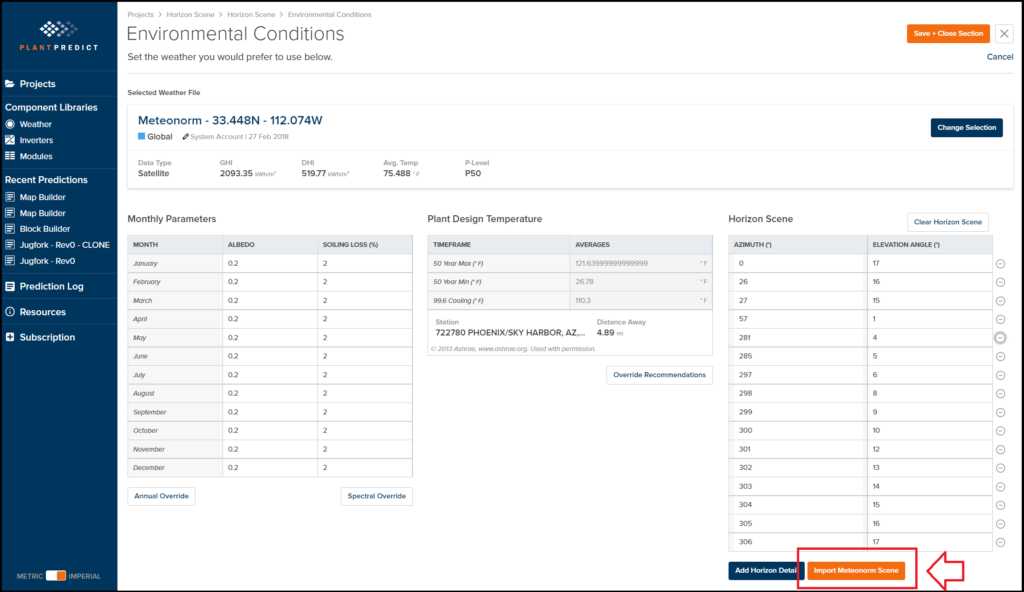
Automatically import Horizon Scenes from Meteonorm for your prediction with the click of a button
* PlantPredict Premium customers are now able to take advantage of a partnership PlantPredict has with Meteonorm that will allow you to automatically import a Horizon Scene for your location anywhere in the world! This Horizon Scene is used to accurately assess the Far Shading Losses for your prediction.
 PlantPredict Premium Enterprise Customers now get 2 Free IT Admin users to help with license and company adminstration
* By popular demand, a new user role has been created that will allow an administrative user to access PlantPredict for company administration purposes only.
* All Enterprise Subscribers will get 2 FREE IT Admin users for their account that they can give out to the individuals who are expected to administer the company account.
* IT Admin users do not have the ability to create Projects or Prediction, so they will be restricted to Company Administration only
BUG FIXES
* MapBuilder: ArrayBuilder custom arrays having 1 subarray fail on ArrayBuilders ‘Calculate DC Capactity’.
* MapBuilder: ArrayBuilder not working for =\< 15 acres.
* MapBuilder: Fix DCFields so fractional arrayCount is not possible.
* Design derate in Map Builder is only adjustable in one direction.
* Multi-Year comparison 8760 specific yield labels now properly reflect they are cumulative values and not averages.
This documentation is built and hosted on [Mintlify](https://mintlify.com), a developer documentation platform.
PlantPredict Premium Enterprise Customers now get 2 Free IT Admin users to help with license and company adminstration
* By popular demand, a new user role has been created that will allow an administrative user to access PlantPredict for company administration purposes only.
* All Enterprise Subscribers will get 2 FREE IT Admin users for their account that they can give out to the individuals who are expected to administer the company account.
* IT Admin users do not have the ability to create Projects or Prediction, so they will be restricted to Company Administration only
BUG FIXES
* MapBuilder: ArrayBuilder custom arrays having 1 subarray fail on ArrayBuilders ‘Calculate DC Capactity’.
* MapBuilder: ArrayBuilder not working for =\< 15 acres.
* MapBuilder: Fix DCFields so fractional arrayCount is not possible.
* Design derate in Map Builder is only adjustable in one direction.
* Multi-Year comparison 8760 specific yield labels now properly reflect they are cumulative values and not averages.
This documentation is built and hosted on [Mintlify](https://mintlify.com), a developer documentation platform.