> ## Documentation Index
> Fetch the complete documentation index at: https://docs.plantpredict.com/llms.txt
> Use this file to discover all available pages before exploring further.
# RELEASE 11.21.0
March 07, 2024
# **PlantPredict**
## **New Features!**
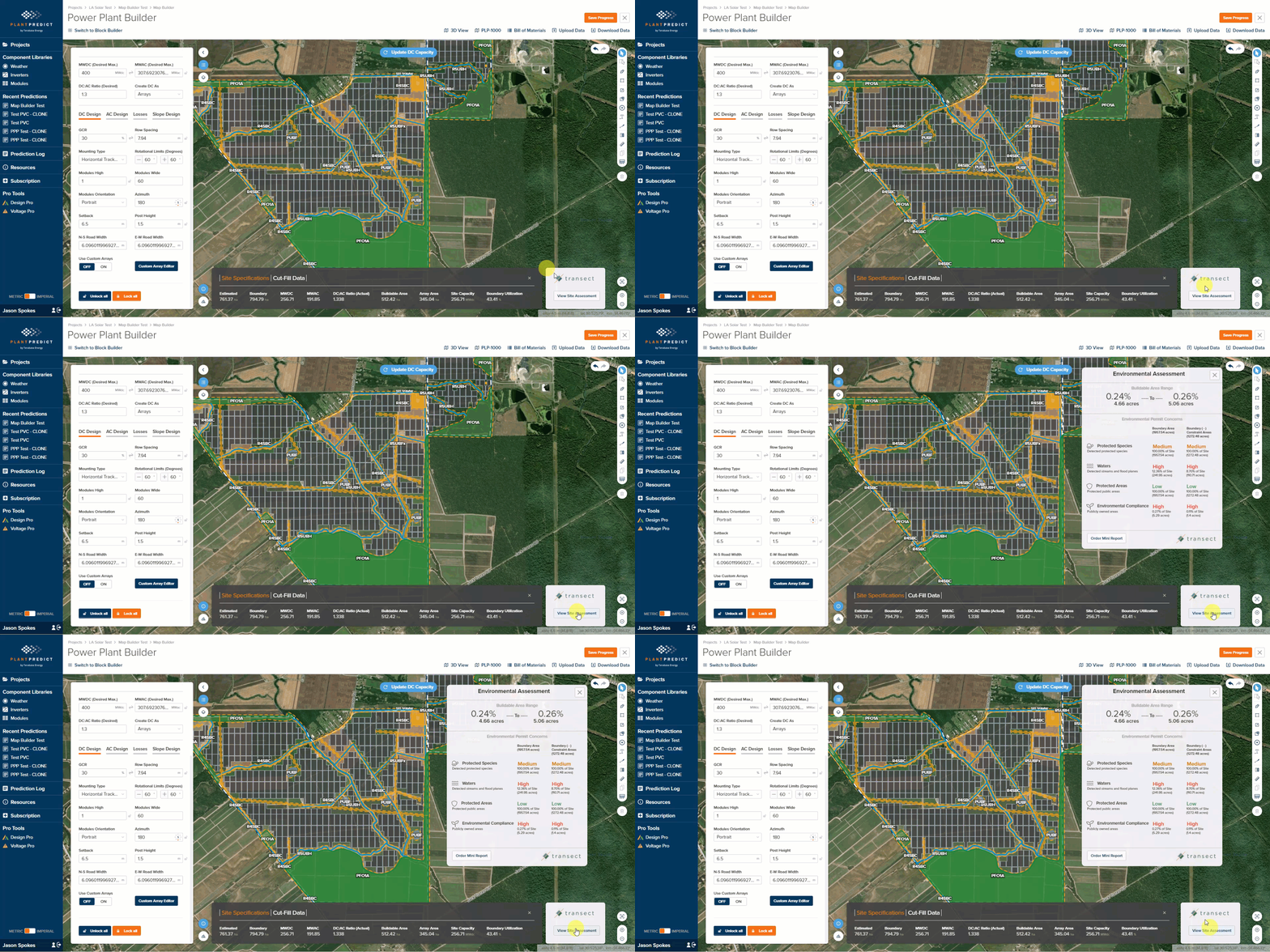
* **Transect Environmental Assessment Integration within Map Builder** - Users on all paid license tiers (Individual, Business, Pro and Enterprise) can now get a free, tailored, environmental assessment directly from Transect (an industry-leading provider of global, environmental permit data) for their project site with one click from within PlantPredict Map Builder. The assessment considers the land within the user-defined site boundary areas and is reported inclusive and exclusive of user-defined constraints. Four categories of environmental risk levels and cumulative areas are reported including:
1. Protected Species
2. Waters (Streams and Flood Planes)
3. Protected Public Areas
4. Environmental Compliance (Publicly Owned Areas)
 * **Minor Improvements**
* Added a new tooltip to the weather upload timestamp settings for easier help in navigation of the weather upload process
* OND files with one, two, or more than four efficiency curves now have more descriptive error message.
## **Bug Fixes**
* Slope azimuth in the DC Field now saves without reverting back to 180 degrees.
* Average post height in the prediction comparison report now responds correctly to the metric vs. imperial conversions.
* Companies with a business tier subscription or above can now have up to 2 IT administrators without counting against their subscription’s maximum number of users.
* Companies with a business tier subscription or above can no longer set draft private modules or inverters as their company default.
* Moved custom module temperature upload UI element to the thermal models section of the DC field.
# **Design Pro**
## **New Features!**
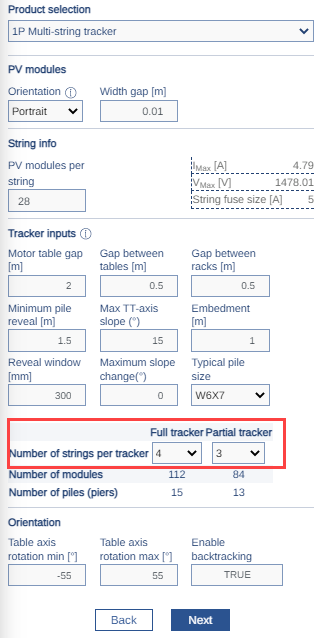
* **1P Multi-String Improvements** - It is now possible for the user to specify the number of strings per rack for both full and partial racks for the 1P Multi-String tracker type. Additionally, we’ve increased the maximum string length supported by the 1P Multi-String tracker up to 36 modules per string and have increased the maximum tracker length to 120 modules.
* **Minor Improvements**
* Added a new tooltip to the weather upload timestamp settings for easier help in navigation of the weather upload process
* OND files with one, two, or more than four efficiency curves now have more descriptive error message.
## **Bug Fixes**
* Slope azimuth in the DC Field now saves without reverting back to 180 degrees.
* Average post height in the prediction comparison report now responds correctly to the metric vs. imperial conversions.
* Companies with a business tier subscription or above can now have up to 2 IT administrators without counting against their subscription’s maximum number of users.
* Companies with a business tier subscription or above can no longer set draft private modules or inverters as their company default.
* Moved custom module temperature upload UI element to the thermal models section of the DC field.
# **Design Pro**
## **New Features!**
* **1P Multi-String Improvements** - It is now possible for the user to specify the number of strings per rack for both full and partial racks for the 1P Multi-String tracker type. Additionally, we’ve increased the maximum string length supported by the 1P Multi-String tracker up to 36 modules per string and have increased the maximum tracker length to 120 modules.
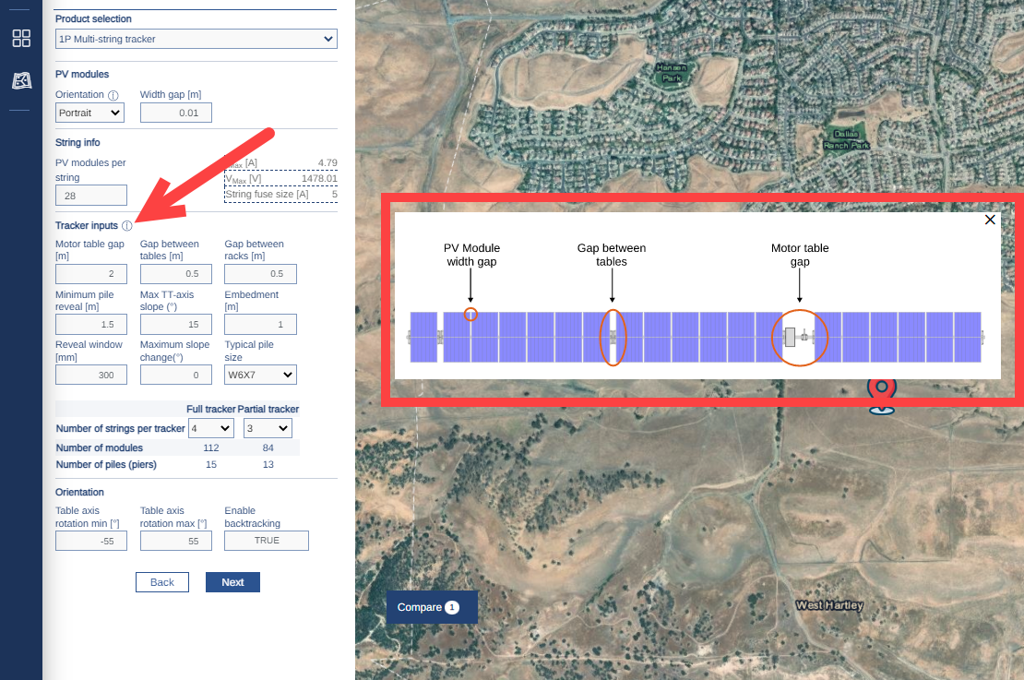
 * **1P Multi-String Info Graphic** - We’ve added a new info graphic to better define the tracker input parameters.
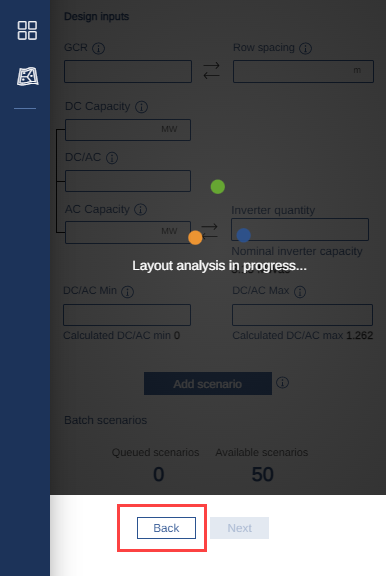
 * **Scenario Analysis Cancel/Back Functionality** - It is now possible to break out of the Layout Scenario Analysis and go back to the previous screen without having to wait for the analysis to complete.
 ## **Bug Fixes**
* Fixed an issue where the scenario analysis graph loaded with no feasible layout solution (AC and DC Capacities = 0).
* Fixed several issues related to Company Default Settings in PlantPredict not carrying over correctly to Design Pro.
* Fixed an exclusion zone rendering issue when exclusion zones overlap.
* Fixed an issue where the default setting for Min Pile Reveal was not calculating correctly based on racking parameters.
* Improved rendering of the Scenario Analysis Table (previously some values were cutting off)
* Fixed an issue with the “Gap Between Racks” input parameter missing from GFT rack type and aligned the naming of this parameter across the platform.
* Improved the Scenario Comparison Table to align terminology and added Pitch and Aisle Spacing
* Fixed several issues leading to failed scenarios due to unique combinations of boundaries and technology selections.
* Fixed several UI-related issues leading to challenges entering data or navigating within the map interface.
# **Terrain Pro**
## **Bug Fixes**
* Fixed an issue where the earthwork cut/fill heatmap legend and color scale was incorrectly rendered. The heatmap legend and color scale range will now be fixed at \<2ft to >2ft (\<0.6m to >0.6m). A dynamic heatmap range will be re-introduced in the near future.
This documentation is built and hosted on [Mintlify](https://mintlify.com), a developer documentation platform.
## **Bug Fixes**
* Fixed an issue where the scenario analysis graph loaded with no feasible layout solution (AC and DC Capacities = 0).
* Fixed several issues related to Company Default Settings in PlantPredict not carrying over correctly to Design Pro.
* Fixed an exclusion zone rendering issue when exclusion zones overlap.
* Fixed an issue where the default setting for Min Pile Reveal was not calculating correctly based on racking parameters.
* Improved rendering of the Scenario Analysis Table (previously some values were cutting off)
* Fixed an issue with the “Gap Between Racks” input parameter missing from GFT rack type and aligned the naming of this parameter across the platform.
* Improved the Scenario Comparison Table to align terminology and added Pitch and Aisle Spacing
* Fixed several issues leading to failed scenarios due to unique combinations of boundaries and technology selections.
* Fixed several UI-related issues leading to challenges entering data or navigating within the map interface.
# **Terrain Pro**
## **Bug Fixes**
* Fixed an issue where the earthwork cut/fill heatmap legend and color scale was incorrectly rendered. The heatmap legend and color scale range will now be fixed at \<2ft to >2ft (\<0.6m to >0.6m). A dynamic heatmap range will be re-introduced in the near future.
This documentation is built and hosted on [Mintlify](https://mintlify.com), a developer documentation platform.